Back to Pastures

The Pastures Field Guide

Your guide to Pastures

Pastures brings the different parts of your walk with God into one place. These are the words you’ll encounter as you journal, study Scripture, pray, reflect, and grow alongside others.

How the pieces fit together

Start anywhere. Each practice can stand on its own, and Pastures helps the parts remain connected.

  1. 01

    Record

    Journal · Learning · Prayer · Reading · Listening

  2. 02

    Connect

    Journeys gather recurring threads. Daily Reflection brings recent activity back as a thoughtful prompt.

  3. 03

    Go deeper

    Ask supports Scripture study. Learnings preserve what you want to remember.

  4. 04

    Build a rhythm

    Daily Grow Session protects time to return.

  5. 05

    Grow together

    Fellow Sheep lets you intentionally share selected things with people you choose.

Chapter 01

Capture what matters

Keep an honest record of what you are living, learning, reading, hearing, and bringing to God.

Field note 01

Journal Entries

Private by default

A private place to write honestly about your day, your thoughts, and what God may be doing in your life.

Journal Entries are free-form personal reflections. Write naturally, without following a template, and optionally add shared content or images.

When Journeys processing is enabled, Pastures privately identifies possible threads such as people, emotions, thanksgiving, prayer requests, challenges, and areas of growth. You review and edit every suggestion before it becomes part of your Journeys.
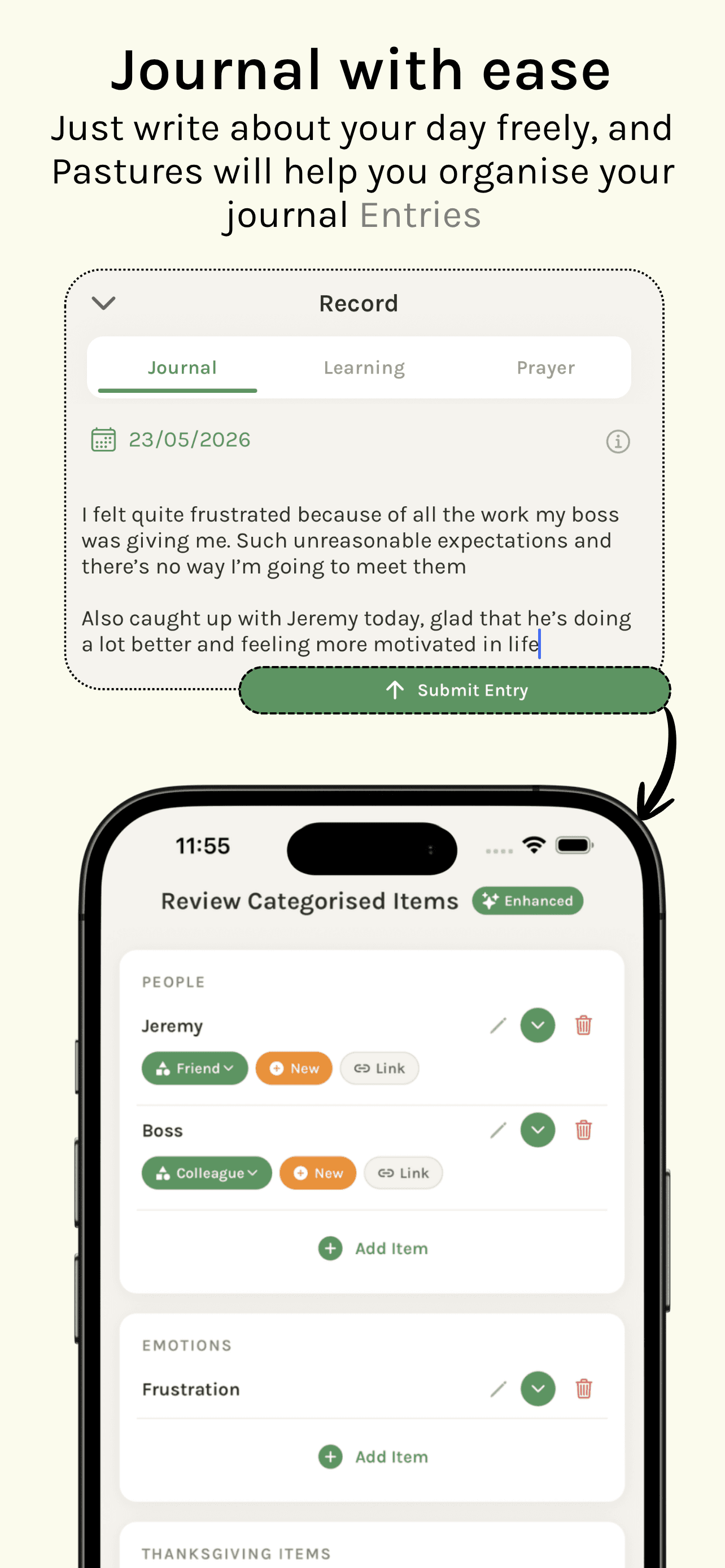
Pastures journal recorder and the review screen for suggested Journey items.
Write freely, then review any suggested Journey threads before keeping them.
How Journal Entries worksShow details +

How it works

  • Write freely in your own words.
  • Optionally let Pastures identify meaningful themes.
  • Review and edit everything before it is added to Journeys.
  • Keep saving entries normally when Journeys processing is switched off.
  • Find entries in your personal timeline and count them towards your activity streak.
  • Record an entry for today or a previous date.

A helpful distinction

A Journal Entry is the original reflection. A Journey is an evolving thread that may connect insights from multiple entries over time.
Field note 02

Learnings

A lasting record of something you have learned from Scripture, a sermon, or time with God.

A Learning is Pastures’ name for a saved biblical insight or set of study notes. It might come from a sermon, quiet time, Bible study, camp, conference, personal reading, or another moment in God’s Word.

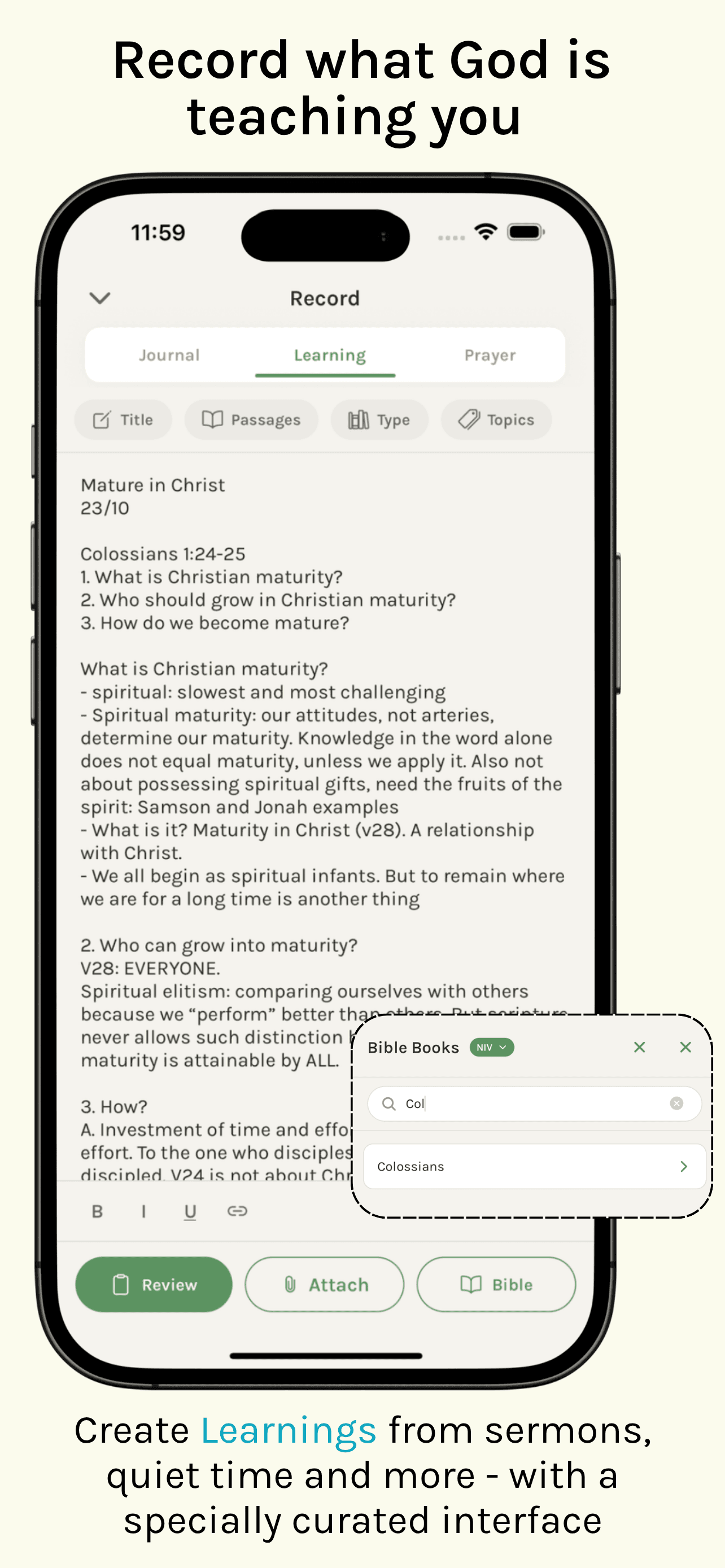
A Learning can hold a title, rich-text notes, Bible passages, topics, a learning type, images, and attached source material. Smart Fill may help organise imported or written material, but the Learning remains your own saved record.

Pastures Learning recorder with notes and Bible passage tools.
A Learning can keep notes, passages, topics, and source material together.
How Learnings worksShow details +

Create a Learning

  • Write directly in the Learning recorder.
  • Import photos, PDFs, Word documents, handwritten notes, or other source material.
  • Save verse notes from inside the Bible reader.
  • Keep notes made while completing a reading plan.

Find it again

  • Search your Learnings.
  • See related suggestions while reading Scripture.
  • Meet them again in reflection questions, Daily Reflections, your timeline, and the Reflect area.

A helpful distinction

A Reading records what you read. A Learning records what you took away from it.

Good to know: When Bible-reader notes become a Learning, Pastures preserves the relevant passages and verse-level annotations.

Field note 03

Prayers

Private by default

A personal record of time spent speaking, listening, or being still with God.

Prayers let you record a prayer in the form that best suits the moment. Add an optional title, choose a previous date, insert Bible verses into a written prayer, or tag the prayer to an existing Journey.

A tagged prayer becomes part of that Journey’s timeline, helping you return to what you prayed and notice how the story develops.

How Prayers worksShow details +

Prayer modes

  • Text — write the prayer in the app.
  • Audio — record the prayer in your own voice.
  • Timed — keep a simple record of silent or unrecorded prayer.

Good to know: Audio prayers remain audio recordings. Pastures does not currently transcribe them automatically.

Field note 04

Reading

A record of what you read, where you reached, and what you want to remember.

Reading covers both Bible reading inside Pastures and reading that you log manually. In the Bible reader, Pastures passively records active sessions lasting at least 30 seconds, including the book, chapter range, approximate duration, Bible version, and whether the reading came from browsing or a reading plan.

You can also log a Bible passage, a physical or digital book, or an article. A manual Reading may include a session title, passage or page details, personal notes, typed or scanned excerpts, and optional progress on your reading shelf.

How Reading worksShow details +

Inside the Bible reader

  • Reading time pauses when the reading screen is not active.
  • Completed sessions appear on your personal timeline.
  • Verse notes can be reviewed and saved as a Learning.

A helpful distinction

Reading answers “What did I read?” A Learning answers “What did I learn or want to carry with me?”

Field note 05

Listening

A place to keep the songs, sermons, and podcasts that spoke to you.

Listening brings meaningful audio into Pastures together with your own reflection. Share a supported Spotify song, sermon, podcast, or other item into Pastures, add what stayed with you, and keep it in your Listening collection.

You can return to the same item later, reflect again, and reopen the original item in Spotify whenever you wish.

How Listening worksShow details +

For now, Listening begins with Spotify

  • Open an item in Spotify.
  • Tap Share and choose Pastures.
  • Add a personal reflection.
  • Find it later under Listening.

Good to know: Listening saves the media reference and your reflections; it does not track every minute of Spotify playback. More ways to capture what you hear are on the way.

Chapter 02

See the connections

Notice the threads that return over time, reflect on recent activity, and study the passage in front of you.

Field note 01

Journeys

Private by default

Living timelines that help you trace recurring people, prayers, emotions, and themes over time.

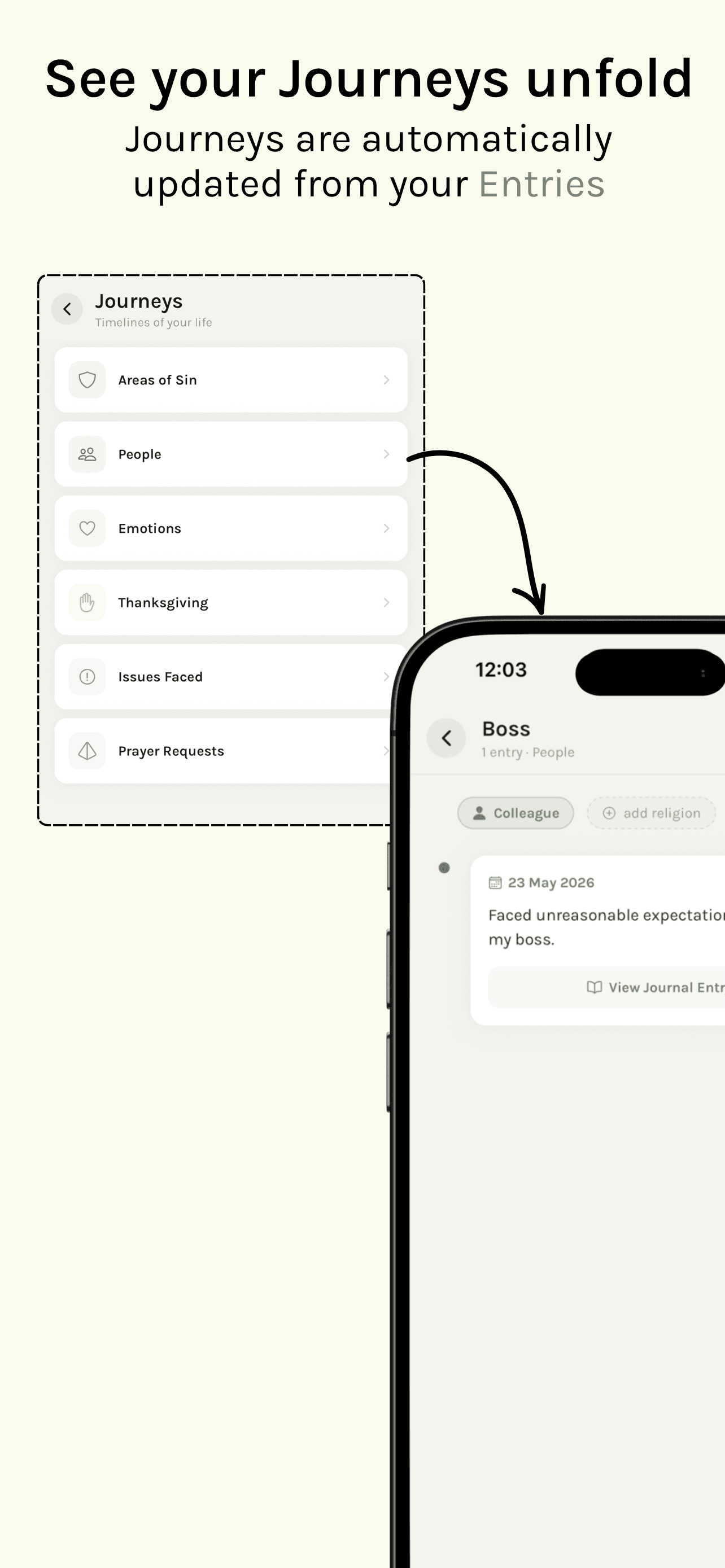
Journeys gather related moments into an ongoing story. When Journeys processing is enabled for a Journal Entry, Pastures privately identifies meaningful threads and asks you to review them before saving.

Each approved thread joins a timeline that can grow across weeks, months, and multiple entries. Journeys are private personal timelines—not reading plans or public social posts.

Pastures Journeys categories and a personal Journey timeline.
Related moments gather into a private timeline you can return to over time.
How Journeys worksShow details +

Built-in categories

  • People
  • Emotions
  • Thanksgiving
  • Prayer Requests
  • Issues Faced
  • Areas of Sin and growth
  • Custom themes

Add to a Journey

  • Create one manually or add an update from its screen.
  • Tag a saved Prayer.
  • Add selected Bible verses from the reader.
  • Pray from the context of an existing Journey.

Field note 02

Daily Reflection

AI-assisted

A personalised reflection prompt grown from your recent activity in Pastures.

Daily Reflection connects what you have already been doing. After you journal, read, record a Learning, pray, or save a Listening reflection, Pastures can generate a thoughtful prompt based on that recent activity.

The aim is not to summarise everything or produce a generic devotional. It identifies one or a few meaningful threads and invites you to pause, notice, pray, or go deeper.

How Daily Reflection worksShow details +

A reflection may draw from

  • A current or previous day’s Journal Entry and its themes.
  • Bible chapters read in the app.
  • A Learning, Prayer, or Listening reflection from that day.
  • A relevant past Learning or connected Bible passage.

You stay in control

  • Return to the source activity where available.
  • Revisit a connected passage or past Learning.
  • Re-grow today’s prompt, then keep the original or the new version.
  • Return to saved Daily Reflections later.

Good to know: If there is no recent activity, Pastures does not invent personal context. It invites you to read, journal, or pray first.

Field note 03

Ask

Pastures AI for the passage in front of you

AI-assisted

A contextual Bible-study assistant for questions about the passage you are reading.

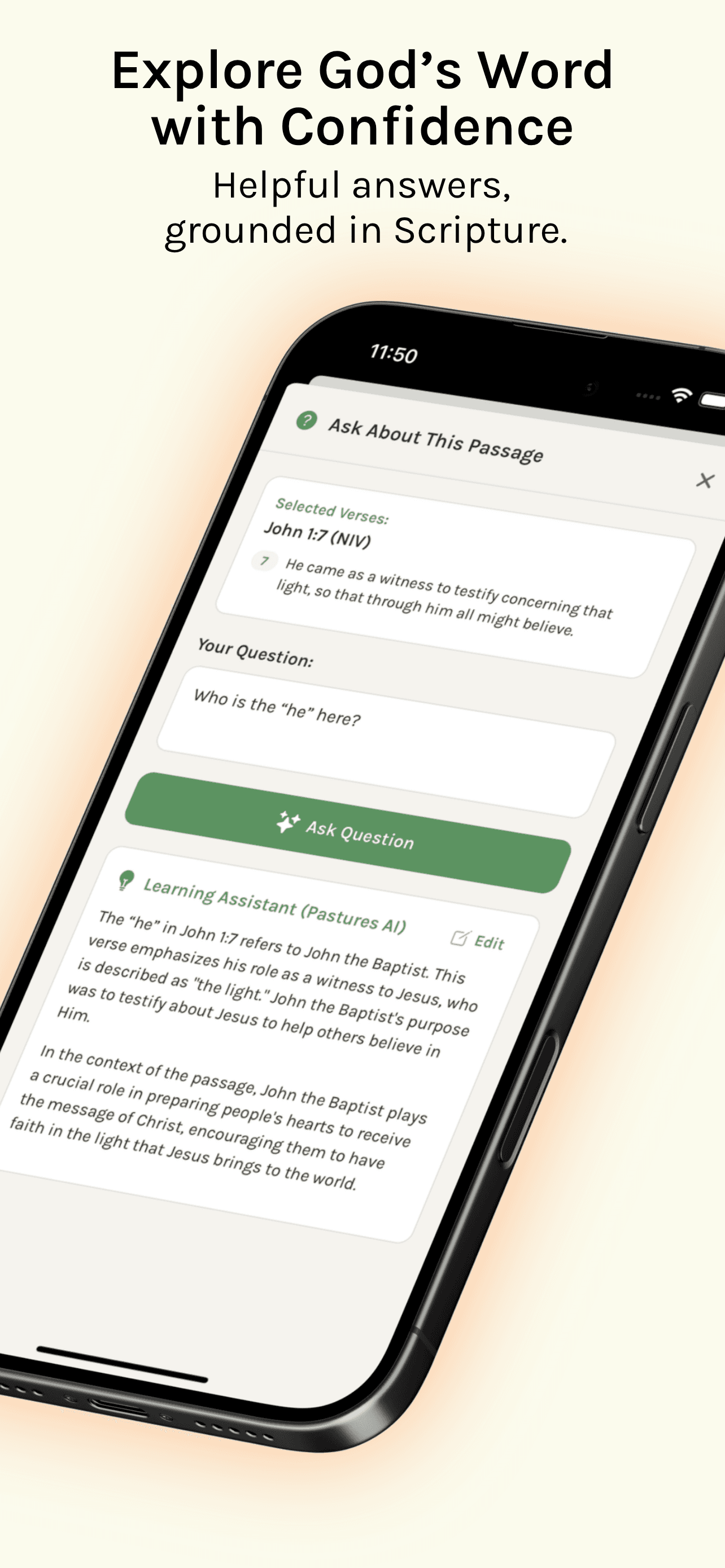
Ask is available from the Bible reading tools. Select verses—or use the current chapter where supported—and ask about context, meaning, a word, a theme, or a connection.

Pastures sends your question and the relevant Scripture context securely to an AI language model, then returns a study-oriented response. You can edit useful material before keeping it in your Bible notes.

Pastures Ask tool showing a question about selected verses and a study response.
Ask works from the Scripture context already in front of you.

“AI can surface helpful context and perspectives, but it can also make mistakes. Ask supports careful Bible study—it does not replace Scripture, prayer, trusted sources, pastoral guidance, or personal discernment.”

How Ask worksShow details +

Ask may help you

  • Explore historical or literary context.
  • Surface cross-references.
  • Clarify terms or ideas.
  • Consider perspectives for further study.

With every response

  • Edit the response before keeping it.
  • Add useful material to your Bible notes.
  • Preview detected Scripture references or open them in the reader.
  • Say whether the answer was helpful.

Good to know: Questions and selected verses are processed confidentially and are not shared with other Pastures users.

Chapter 03

Build rhythms and grow together

Make room to return, then share only what you choose with people you trust.

Field note 01

Daily Grow Session

A scheduled invitation to set aside focused, undistracted time with God.

A Daily Grow Session helps you create a repeatable quiet-time rhythm. Choose a time and a session length of 5, 10, 15, or 30 minutes; when the time comes, Pastures offers a session that begins when you are ready.

The session does not dictate what you must do. It simply protects time you may use to read, journal, learn, or pray.

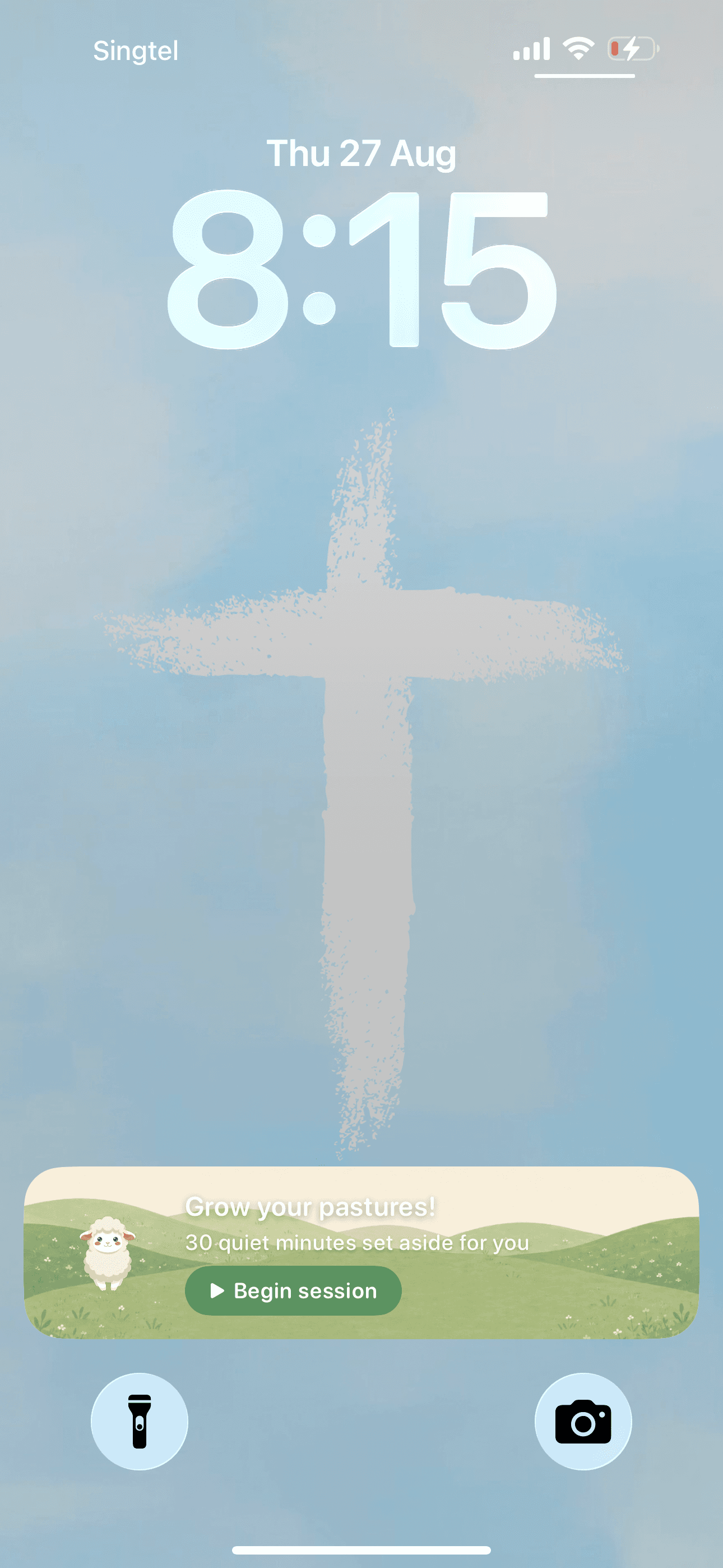
A Daily Grow Session invitation displayed on an iPhone Lock Screen.
On iPhone, a Grow Session can arrive as a gentle Lock Screen invitation.
How Daily Grow Session worksShow details +

On your phone

  • On iPhone, the session appears as a Lock Screen Live Activity.
  • On Android, it arrives as a notification and runs as a countdown.
  • The timer can continue while Pastures is closed.

Good to know: You may optionally enable App Lock and choose distracting apps to rest while the timer runs. App Lock is a focus aid, not a requirement.

Field note 02

Fellow Sheep

Private by defaultBeta

An opt-in space to grow in Christ alongside people you choose.

Fellow Sheep is the community area of Pastures—described in the app as being “outside your pastures.” Connect by username or invite link; every request must be accepted.

You can remove connections, report shared content for private review, or block another person. Fellow Sheep is currently presented as a beta feature.

“Your journal, prayers, and reflections stay private. Nothing is shared unless you choose it, one item at a time.”

How Fellow Sheep worksShow details +

Spaces for growing together

  • Grow — view fellow sheep and their pasture activity.
  • Exchange — privately share Learnings with one person.
  • Feed — see Learnings that companions intentionally share with their wider connection group.
  • My Trail — manage your profile, invite link, and shared posts.
  • Modules — use shared tools for growing together.

First live module: Bible Book Reading Co-op

  • Read a book of the Bible with one fellow sheep.
  • Take turns progressing through chapters.
  • Add reflections as you go and see the shared pasture develop.

Bring the parts of your walk together

Begin with the practice that fits today. Pastures will help you keep it, return to it, and see how it connects over time.